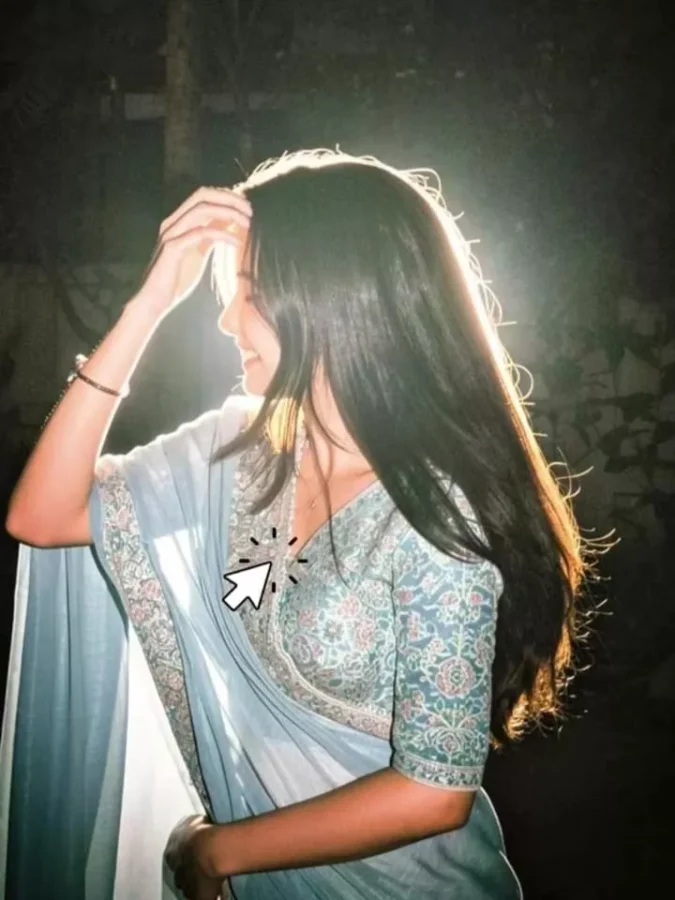
Trending Lofi Dusk Filter AI Photo Editing Prompt- Friends, right now AI photo editing is becoming extremely viral on social media, and people are using AI tools to turn their normal photos into stylish and attractive images. Among all these trends, one special “aesthetic” editing style is getting a lot of attention where users are applying cinematic AI effects to their regular photos. Friends, you can also create these kinds of photos very easily and completely free. With the help of AI tools like ChatGPT or Gemini, you can generate stunning aesthetic images in just a few steps. For this, you only need a good photo and a proper prompt. In this article, I will share the prompts and explain the full process of using them. Just follow all the steps carefully.
Details Of Trending Lofi Dusk Filter AI Photo Editing Prompt
If you look at these edits carefully, you will notice how a simple photo gets transformed into a cinematic and aesthetic masterpiece with glowing flash effects. Your normal image turns into a stylish photo that gives a complete cinematic vibe. This editing style is popularly known as the “Lofi Dusk Filter.” Many users are currently trying to create this effect using Instagram filters, but some people are unable to find the exact filter. Because of this, AI-generated prompts are now becoming a popular alternative. With the help of these prompts, you can easily create the same trendy filter-style look using AI tools. In this article, I will show you exactly how to do it.
Why This Trend Is So Viral?
Friends, this trend is becoming viral because people really love cinematic and aesthetic-looking photos. Although this filter is available on Instagram for some users, many people still cannot access it properly. That is why users are searching for other easy methods to create the same effect. The best thing about AI tools is that they make this process much simpler. Earlier, people had to search through different Instagram accounts to find the correct filter, but now you can generate the same style instantly just by using a text prompt. This trend also looks very premium because it adds a dark cinematic background along with glowing flash lighting on the face, making the image look more professional and eye-catching.
Create a dark moody nighttime atmosphere with a deep muted background fading into near-black shadows. Add a powerful glowing backlight directly behind the subject, creating an intense white rim light around the hair, shoulders, arms, and full body outline.Add a soft luminous aura surrounding the entire body, especially around the edges of the clothes, hair, hands, and legs, creating a dreamy glowing silhouette effect like cinematic night-flash photography. The glow should feel natural and atmospheric, not fantasy or neon. Include soft bloom diffusion, light bleeding, halation, and subtle mist around bright areas to create that glowing body effect.Combine this with subtle direct front flash lighting for a realistic DSLR flash aesthetic. Use high contrast cinematic lighting with warm peachy skin tones, soft highlights, deep shadows, slight overexposed glow on white clothing, and realistic low-light ambience.Add authentic vintage digital-camera texture: visible fine film grain, low-light sensor noise, faded blacks, muted dark tones, soft contrast, slight haze, and nostalgic Y2K lo-fi mood.Background should remain blurry, dark, and atmospheric with faint silhouettes, soft bokeh lights, and ambient dusk/night tones. Keep the image ultra realistic and cinematic, like an editorial night portrait captured on an 85mm DSLR lens with flash photography.Style keywords: glowing body aura, cinematic rim light, bloom glow, halation effect, soft flash diffusion, dreamy silhouette glow, Instagram Lofi Dusk filter, CCD camera aesthetic, disposable camera flash, grainy night portrait, moody dusk tones, realistic skin texture, shallow depth of field, photorealistic, ultra detailed, 4K.
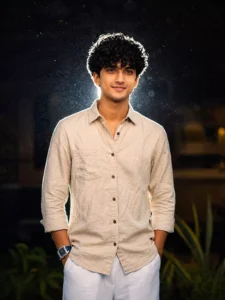
Relight image. Background: Deep and muted, darker tone at the top, grainy. Lighting: Bold night-flash aesthetic combining natural light with direct front-facing flash. Tiny highlights. Strong backlighting creating a brilliant white rim light around the subject, with a soft fill light from the front. Cinematic high-contrast mood. Skin rendered with gentle peachy tones.
How To Create Image Using ChatGPT?
To create this Lofi Dusk style image, first copy any prompt provided in this article. After that, open the ChatGPT application and log in to your account. Now paste the copied prompt inside the chat section. Next, click on the plus icon and upload the photo you want to transform. For better results, try to use a photo with a stylish or aesthetic vibe. Once your image is uploaded, simply send the prompt and wait for a few moments. After some time, ChatGPT will generate your edited image automatically. The final result will look like a cinematic filter effect with a dark background and flash lighting on your face.
Conclusion
So friends, this is how you can create trending “Lofi Dusk Filter” AI photos using ChatGPT or similar AI tools. There are also some Instagram filters available for this effect, but using AI prompts gives you more control and better-looking results. I hope you liked this AI photo editing tutorial and understood the complete process properly. If you want to explore more trending AI photo editing styles, you can visit this website for more tutorials and prompts.
